Salesforce logoNative to Salesforce

Remote Call Center for Salesforce: Secure CTI for Distributed Teams

Enable teams to run a remote call center in Salesforce with calling, supervision, agent availability, and reporting connected to CRM records.

Contact our Experts
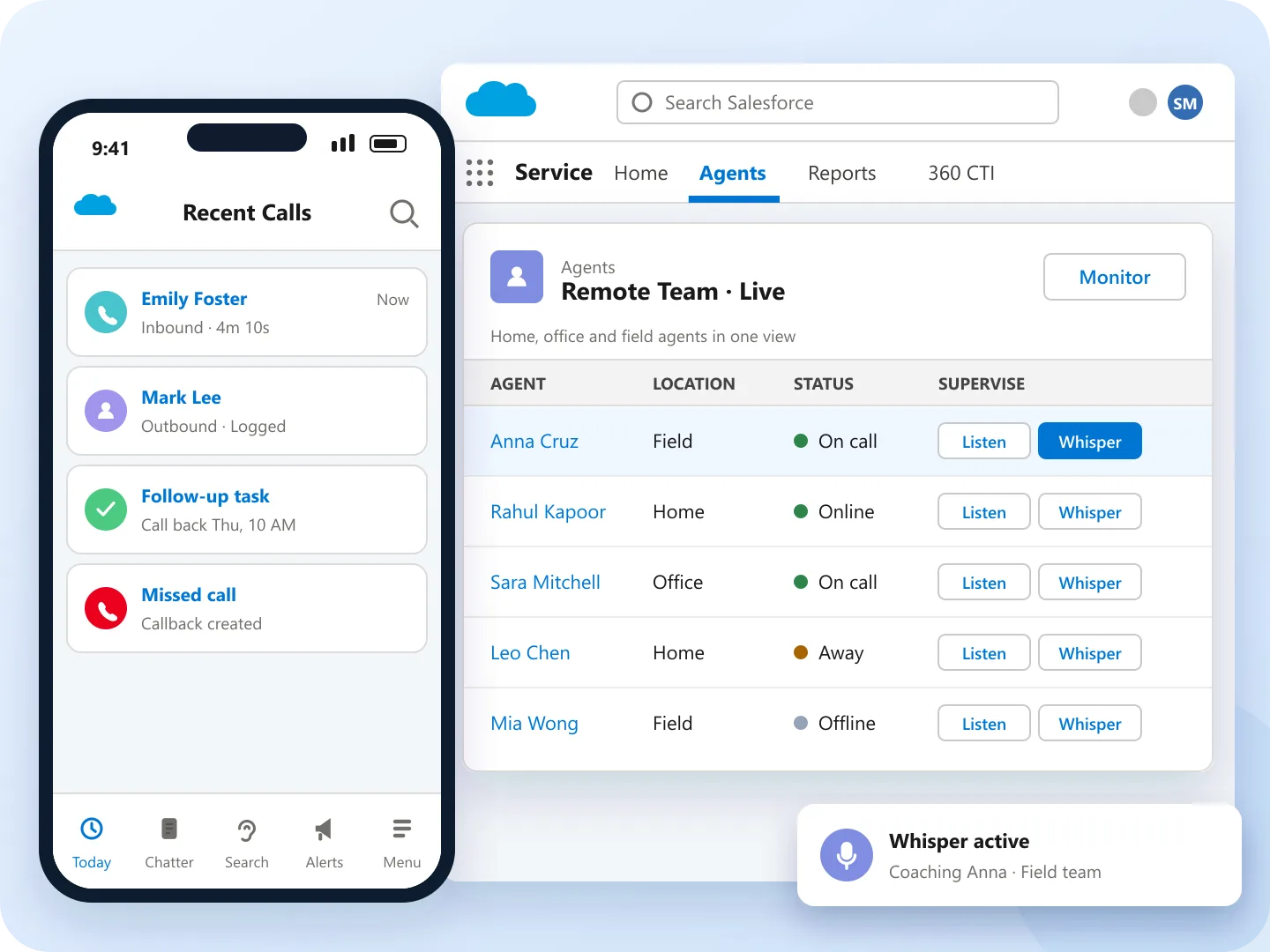
Remote call center Salesforce setup: 360 CTI mobile app and live remote team view with whisper coaching

Trusted by the Best Worldwide

PageGroup logo INSEAD logo Abbott logo Amgen logo DPD logo Dexcom logo Liberis logo Parkinson's UK logo

Capabilities for Remote Call Center Success

01

Manage Calls with a Mobile App

Agents call remotely through Salesforce mobile and 360 CTI's mobile app, keeping activity tied to CRM records.

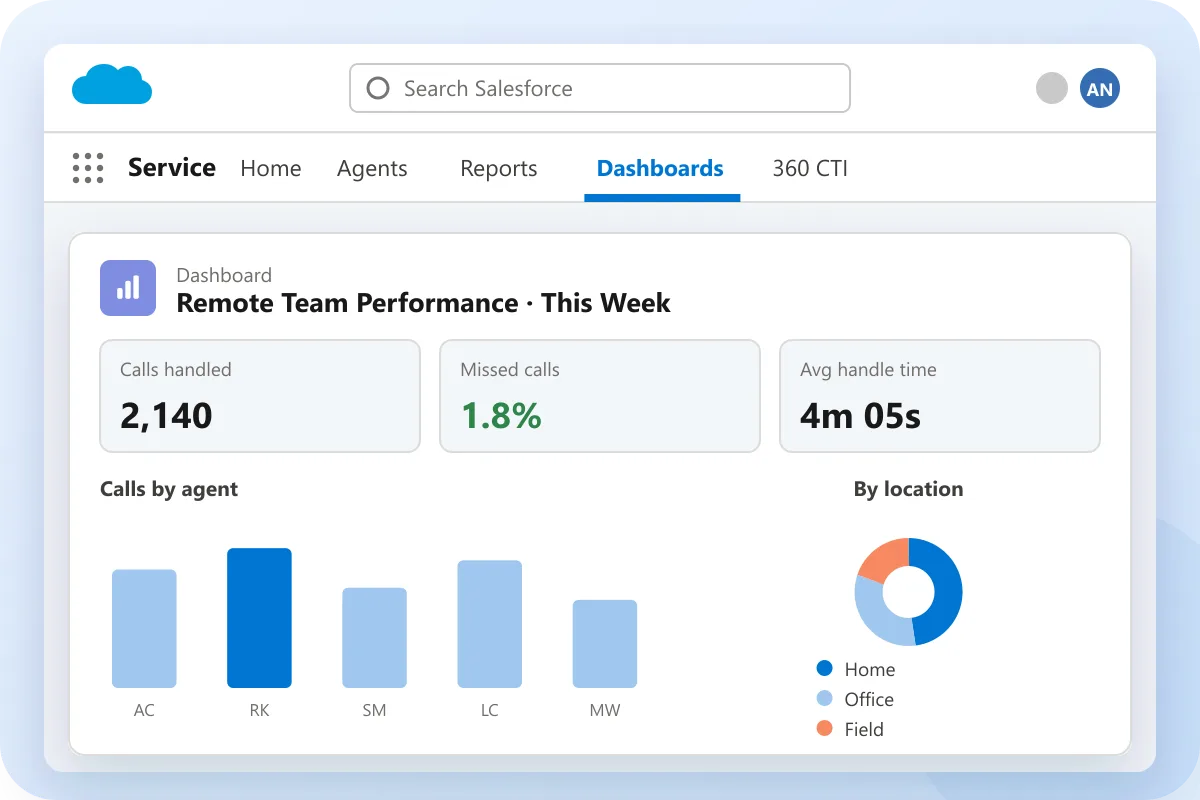
Remote call center Salesforce dashboard showing calls handled, missed calls and calls by home, office and field agents
02

Live Call Supervision

Monitor, whisper, or barge into live calls to coach agents in a remote call center in Salesforce.

03

Balance Workloads for Remote Teams

Distribute calls by availability and skills with Salesforce call center integration to reduce missed calls.

04

Faster Connectivity with Remote Teams

Enable remote agents to update their availability (Online, Away, Offline) so calls are routed only to available team members, minimizing delays.

05

Boost Remote Team Accountability

Track calls, missed calls, durations, and outcomes across your remote call center Salesforce deployment for better Salesforce call center management.

06

Deliver a Consistent Customer Experience

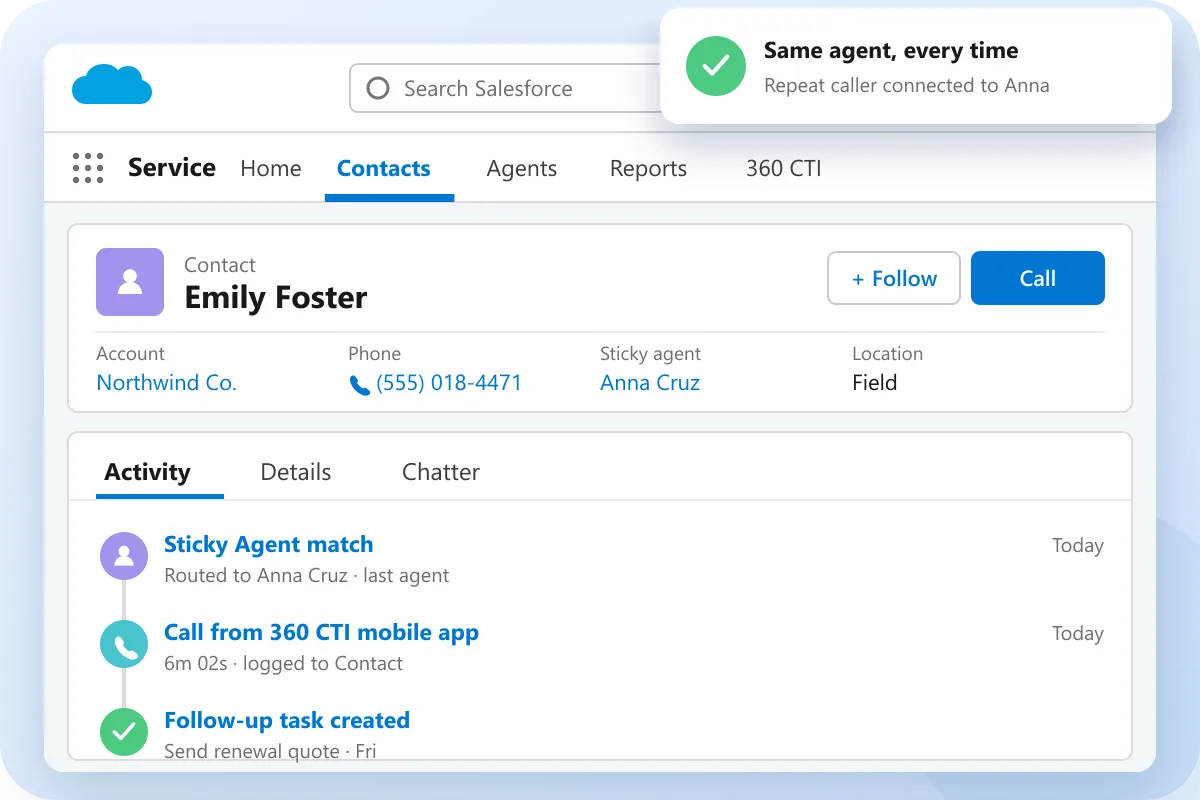
Ensure repeat callers connect with the same agent using Sticky Agent, building trust and consistent support, so remote teams stay unified and professional.

Request a Demo

How 360 CTI Works for Remote Call Center Teams

Wherever agents work, every call, status change and outcome stays connected to Salesforce.

01

Connect Agents Anywhere

Agents sign in from home, the office or the field on desktop or the 360 CTI mobile app.

02

Set Availability

Agents mark themselves Online, Away or Offline, so calls only reach people who can answer.

03

Route with Context

Calls follow skills, availability and Sticky Agent rules, with the Salesforce record on screen.

04

Supervise and Report

Managers monitor, whisper or barge into live calls and track outcomes in Salesforce dashboards.

Remote call center Salesforce contact record with Sticky Agent routing and calls logged from the 360 CTI mobile app

Built for Every Role on Your Remote Team

One Salesforce-native calling workspace, wherever your people work.

Remote Agents

Make and take calls from desktop or mobile with customer context and automatic call logging.

Field Teams

Call from the 360 CTI mobile app on the move while every call and note syncs to Salesforce.

Remote Supervisors

Listen, whisper and barge into live calls to coach agents without being in the same room.

Contact Center Managers

Track calls, missed calls and outcomes across locations from Salesforce dashboards.

AI-led CTI, Built for Reliable Remote Teams

14+Years of Trust
ZeroIntegration Hassle
100%Free Support
No CodeTelephony Solution
Salesforce-NativeTelephony
100%Data Security

Remote Teams Trust 360 CTI

Reviews from verified customers on the Salesforce AppExchange

★★★★★

Fully native CTI app for Salesforce.

Finally a fully native CTI app for Salesforce. The time based call routing is awesome — last communicator, record, owner, simultaneous ring. Price is more than reasonable, but more importantly the functionality is there.

JR

Josh Rodgers

COO
★★★★★

Dependability and the best native Salesforce solution

I have worked with multiple enterprise calling solutions in the past and 360 CTI beats them on dependability. This is a well developed calling solution that works across industries and provides enterprise quality at affordable prices.

RR

Rachel Reece

System Administrator
Remote call center Salesforce case study: real estate agents multilingual lead conversion
Case study

AI Connect Helped Real Estate Agents Increase Multilingual Lead Conversion by 39%

Read the case study

FAQs About Remote Call Center for Salesforce

How does a virtual call center in Salesforce support remote teams effectively?

A virtual call center Salesforce setup supports remote teams by keeping calling, customer records, and agent activity in one place. 360 CTI connects remote calling, status updates, supervision, and call logging to Salesforce records. Managers get visibility into calls and outcomes, while agents work from approved locations with CRM context.

What makes Salesforce a strong call center setup for remote teams?

A Salesforce call center for remote teams works well when calling activity stays connected to customer data. 360 CTI gives agents call controls, customer context, status management, and activity capture inside Salesforce. Remote teams can manage calls without losing visibility across leads, contacts, accounts, and cases.

How does remote call center software for Salesforce maintain call quality and reliability?

A remote call center in Salesforce maintains quality through supervisor visibility, call tracking, and agent availability controls. 360 CTI supports live monitoring, whispering, barging, call logs, and fallback handling for distributed teams. Salesforce managers can review conversations, missed calls, and outcomes without depending on separate reports.

Can a remote call center in Salesforce scale quickly for growing teams?

Yes, Salesforce call center management becomes easier when users, queues, and rules can be managed from a cloud setup. 360 CTI supports distributed agents, status-based call handling, team visibility, and reporting. Salesforce teams can add remote users while keeping call records and performance data organized.

What features should businesses look for in the best virtual call center software for Salesforce?

A strong virtual call center Salesforce setup for a Salesforce call center for remote teams should include remote calling, live supervision, user status, call logging, dashboards, and Salesforce call center integration. 360 CTI connects these features with Salesforce records and daily agent workflows. Businesses get clearer visibility into remote performance, missed calls, and customer follow-ups.

How does 360 CTI help businesses manage a remote call center in Salesforce efficiently?

A remote call center in Salesforce helps manage distributed teams by connecting calls, agents, and reporting to CRM records. 360 CTI uses Salesforce call center integration to capture activity, route calls by availability, and track outcomes. Managers can monitor remote call volume, response speed, and agent performance inside Salesforce.

Salesforce CTI Insights & Calling Guides

Guides, setup walkthroughs, and calling strategies for Salesforce admins and calling teams.

Blog
Nov 9, 2026

Agents Need Agents: Why the Phone Call Is Where Agentic ROI Goes to Die

Read More →
Blog
Nov 9, 2026

What Is Salesforce Koa? A CRM Reasoning Model, Explained for Calling Teams

Read More →
Case Study
Sep 9, 2026

A Healthcare Provider Reduced Unnecessary Call Transfers by 61% with 360 CTI

Read More →

Power Remote Teams. Connected Calls. Effortless Service.

Have questions or want to know more about AI-powered 360 CTI?

Contact our experts
Live Chat