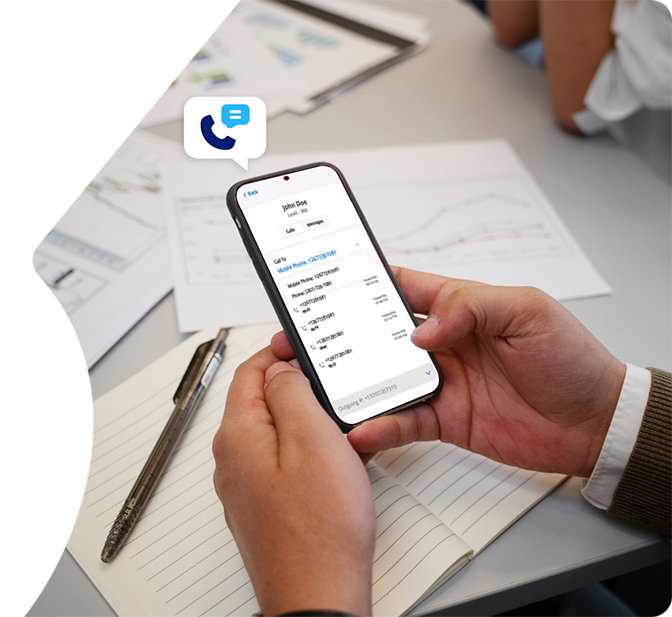








Salesforce Mobile Call Management to Ensure Accessible Calling

Enable agents to manage Salesforce calls anytime, anywhere, providing real-time call access and instant CRM updates.

Salesforce Mobile Call Management

Mobile Salesforce Call Management Features

360 CTI’s Salesforce-native mobile app for call management enables inbound and outbound calling, real-time data sync, and post-call actions on the go.

Salesforce Call History Insights

Call History Insights

Get a detailed view of outgoing, incoming, and missed calls to maintain complete visibility into customer interactions.

Salesforce After-Call Actions

After-Call Actions

Add dispositions and call notes to document every interaction, enhancing Salesforce Mobile CTI tracking.

Salesforce Quick Contact Search

Quick Contact Search

Search contacts instantly by name or number, improving Salesforce mobile calling efficiency.

Real-Time Salesforce Sync

Real-Time Salesforce Sync

Call data updates automatically for accurate reporting and performance via real-time Salesforce sync.

Texting App From Salesforce

Call From’ Field

Select assigned numbers for professional communication, integrated with Salesforce mobile VoIP.

Texting Through Salesforce

Incoming Call Details

View caller and recipient info, including related records, supporting Salesforce mobile call management.

mobile VoIP app

On-Call Controls

Manage calls with mute, speaker, and disconnect options, enhancing Salesforce Mobile CTI operations.

Want to upgrade
calls with AI?

Why 360 CTI's Mobile Calling Matters

step-01:
Increased Call
Efficiency

Agents use Salesforce mobile call management on the go, reducing response time and improving handling accuracy.

Step-02:
More Customer Engagement

Access to call data and mobile tools enables faster interactions, enhancing Salesforce mobile calling efficiency.

Step-03:
Higher Sales
Conversions

Quick access to customer information allows agents to act immediately, improving follow-ups and opportunity conversion.

AI-led 360 CTI, Built for Mobility

14+

Years of Trust

Zero

Integration Hassle

100%

Free Support

No Code

Telephony Solution 

Salesforce-Native

Telephony

100%

Data Security

Hear What Our Customers Say

FAQs

FAQs About Salesforce Mobile Call Management

The app allows agents to handle calls, access context, and log outcomes from mobile devices. It provides inbound and outbound calling, real-time Salesforce record sync, after-call logging, and contact search — all without requiring Salesforce desktop access. Every call made or received through the app ties automatically to the correct Salesforce lead, contact, or opportunity record, maintaining the same data accuracy as desktop-based calling.

Yes. 360 CTI's mobile app supports both inbound and outbound interactions while keeping call data in CRM records, making mobile calling as complete as desktop calling. Incoming calls display a screen pop with the caller's Salesforce record before the agent answers, giving full context without opening a laptop. Outbound calls dial from the agent's assigned business number and log automatically against the correct record, maintaining professional presentation and accurate CRM tracking from any location.

Call data updates instantly to Salesforce, including dispositions and recordings, for accurate reporting and agent performance. The sync covers call duration, outcome, agent disposition, and any description added during after-call actions — with no manual upload step required. Data appears in Salesforce the same way it would from a desktop call, so managers see mobile agent activity alongside desktop agent activity in a single unified view.

Yes. Field agents can view complete call history and notes directly in the app, for informed follow-ups. Each call history entry is linked to the associated Salesforce record, so agents review previous conversations and context before returning a call or attending a meeting. Call history updates automatically as new calls are completed, keeping the record current without any manual logging between visits.

Yes. All calls and data are encrypted, and Salesforce Mobile CTI integrates secure VoIP for safe interactions. Customer phone numbers are not exposed on the agent's personal device — calls are handled through the assigned business number within the Salesforce environment. Call data syncs directly to Salesforce and is not stored locally on the mobile device, keeping sensitive information inside the secure CRM infrastructure.

The Salesforce mobile call management app enables real-time calling, logging, and monitoring from anywhere, while ensuring all records stay current across devices. Salesforce desktop call management requires agents to be at a computer, meaning field reps and remote teams either miss calls or log them manually after the fact. 360 CTI's mobile app brings the same screen pop, after-call logging, and real-time Salesforce sync to any mobile device, so field agents maintain identical CRM accuracy whether they are in the office or on the road.

From the 360 CTI Blog

Practical guides and setup walkthroughs for Salesforce calling teams.

Blog
Jul 16, 2026

360 CTI vs Genesys: Which Is Right for Salesforce-First Teams 

Read More
Blog
Jul 13, 2026

360 CTI vs Five9: Which Is Better for Salesforce Teams in 2026 

Read More
Blog
Jul 10, 2026

Salesforce CTI for Education to Improve Enrollment Rates 

Read More

Stay Connected with 360 CTI's Mobile Calling Features

Have questions or want to know more about AI-powered 360 CTI?

Contact our Experts

We use cookies to enhance your browsing experience, serve personalized ads or content, and analyze our traffic. By clicking "Accept All", you consent to our use of cookies.

WhatsApp Live Chat
