
📋 BLOG SUMMARY
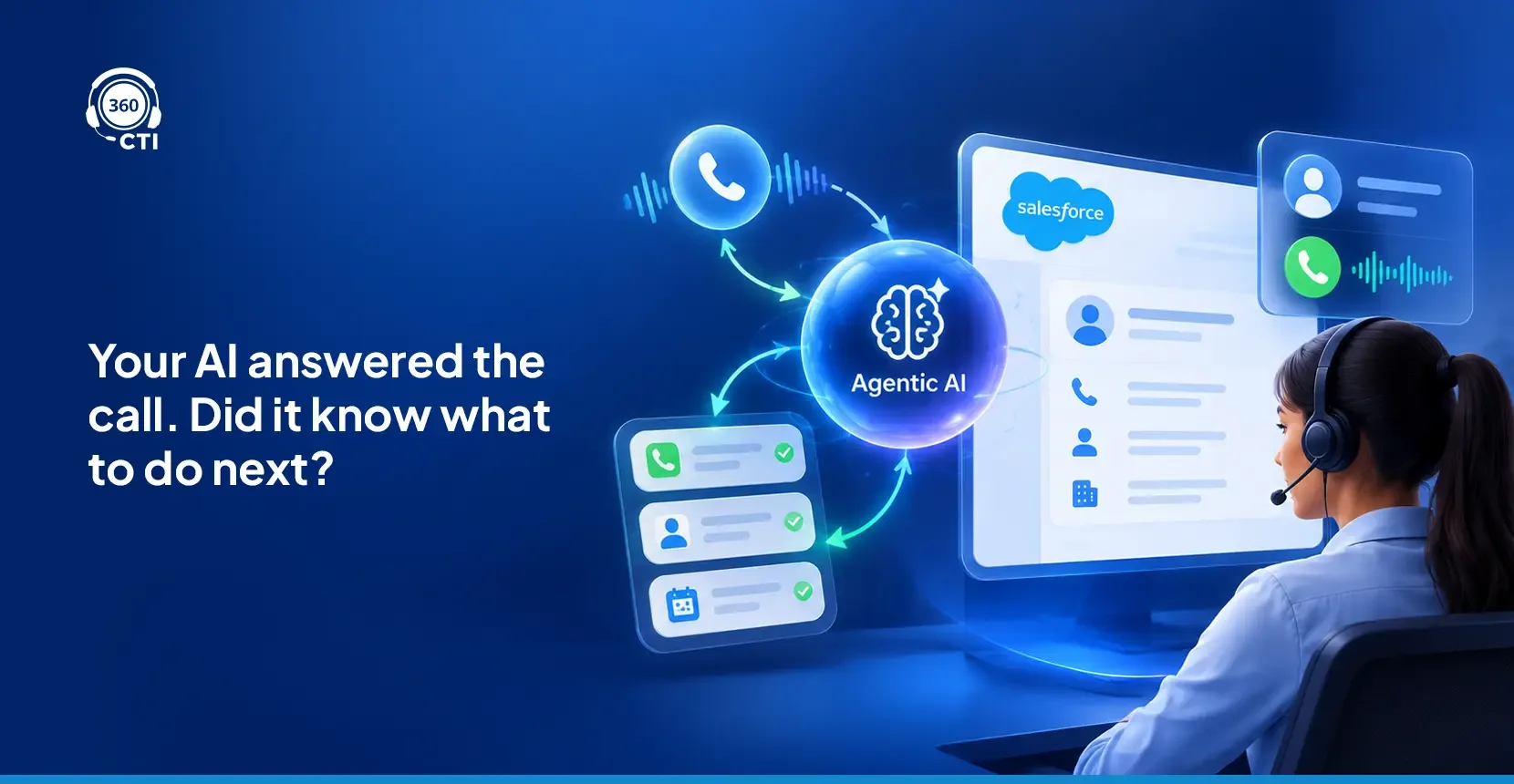
Most contact center teams think an agentic AI call center runs on a smarter chatbot. It doesn't. A true agentic AI system perceives context, makes decisions, and acts without a human trigger at every step. The gap between what teams expect and what they actually deploy is exactly where implementations fall apart.
Most Salesforce contact center teams approaching agentic AI right now fall into one of two camps. The first group is genuinely excited: they've seen demos, they know the terminology, and they want to move fast. The second group is nervous. They've watched a previous automation project underdeliver and they're not in a hurry to repeat it.
Both groups share one real problem: neither has a clear picture of what agentic AI in a call center actually does, how it differs from other AI tools, and what consistently gets teams into trouble during deployment. If you're new to Salesforce calling tools in general, our Salesforce calling solution guide covers the fundamentals before you layer AI on top.
That's what this blog covers.
What "Agentic" Actually Means in a Contact Center
Agentic AI refers to a system that can perceive a situation, make a decision, execute a set of tasks, and escalate to a human when the context requires it. All without a human pressing a button between each step.
That's it. No complicated definition needed.
The distinction matters more in a contact center than almost anywhere else. A rule-based bot reads a keyword and returns a scripted reply. An agentic system reads the full customer context, checks live data in Salesforce, decides whether this caller needs a self-service answer or a senior rep, and routes accordingly. One is a lookup table. The other is active decision-making. Those aren't the same thing, and conflating them leads to deployments that disappoint.
Salesforce's own Agentforce architecture reflects this direction: AI agents built on top of CRM data that act within defined guardrails rather than just responding to pre-written prompts. The shift from "AI that answers" to "AI that acts" is real, and it changes what deployment looks like in ways most teams aren't prepared for.
Contact Center AI Is Not the Same as Sales AI
This is a distinction most implementation teams miss entirely, and it costs them.
In a sales context, an AI agent might qualify a lead, send a follow-up email, or book a meeting slot. If it makes the wrong call on a lead, you've lost a pipeline opportunity. Annoying. Recoverable. The blast radius is small.
Contact centers are built around a different relationship. Your callers are already customers. They're calling because something went wrong: a billing error, a service issue, a complaint that needs to be documented. The cost of a bad AI decision isn't a missed sale. It's a broken trust moment, and those don't reverse with a polite email the next morning.
That difference changes everything: the handoff logic, the escalation triggers, the AI's access to historical case data, how the transcript gets written to Salesforce. It even changes what metrics you use to judge success. A team deploying the same AI configuration they used for lead qualification into their customer support queue is setting up for a genuinely difficult quarter.
For a grounding view on how the underlying Salesforce telephony architecture affects all of this, our guide to Salesforce telephony integration covers the foundational decisions that shape what AI can actually do on top.
Three Things Teams Get Wrong When Deploying AI Agents in Contact Centers
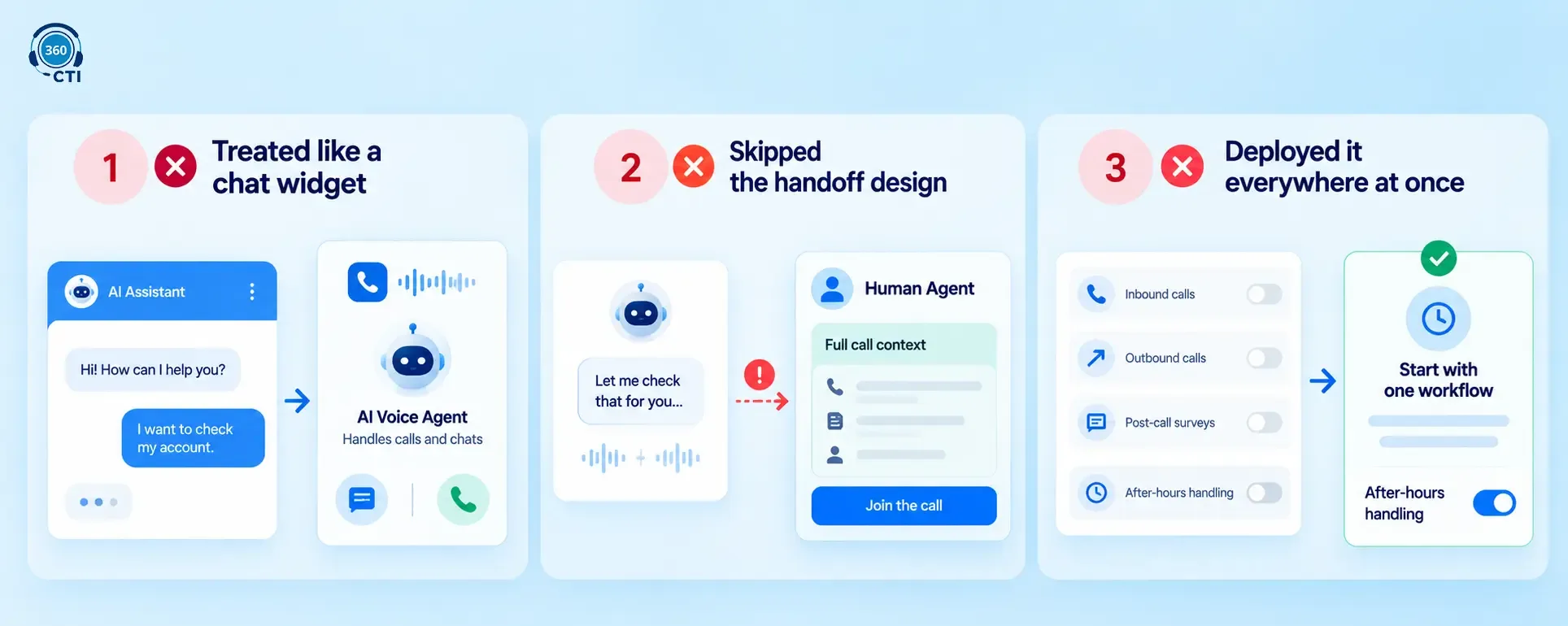
Here are the mistakes that show up consistently. Not in theory. In practice.
1. They Treat It Like a Chat Widget
Most teams start their agentic AI contact center pilot in a chat window. That's understandable: chat is the easiest channel to configure, the fastest to demo, and the safest to test without impacting live calls. Results look clean. Leadership is happy.
But chat and voice aren't the same problem. Voice requires real-time transcription under noise conditions, intent recognition without typos to anchor on, and a handoff experience that doesn't feel mechanical when it triggers. Teams that build voice in from the start produce better deployments than teams that bolt it on after a chat pilot. Consistently.
If your current AI setup only operates in a chat window, it's a chatbot with a better pitch deck. Not a proper agentic AI call center.
2. They Skip the Handoff Design
In practice, most configuration effort goes into what the AI does when it works. Almost nothing goes into what happens when it doesn't. That's the wrong ratio. The handoff, when it breaks, produces the worst customer experience in the contact center. Worse than no AI at all.
A properly designed handoff covers four things: a clear escalation trigger (what condition hands the call off?), a warm transfer protocol (the human agent sees full context before they say hello), a silence threshold (how long does the AI wait before escalating proactively?), and a failure fallback (what happens if no agent is available when the AI needs one?).
Most teams configure the first two. The silence threshold and failure fallback are what your customers actually notice, because those are the moments that feel broken to them.
3. They Deploy It Everywhere at Once
Leadership wants impact. The capability is there. So the team activates AI across inbound calls, outbound follow-ups, post-call surveys, and after-hours handling simultaneously.
That's a setup for mixed results and a hard conversation at the next quarterly review.
Start with one workflow. After-hours handling is almost always the right first choice: the stakes are lower, the scope is defined, and the performance data comes back clearly. Run that workflow until you understand the failure modes. Then expand. That's not excessive caution. It's how you build something that holds up.
Is your contact center AI deployment designed to handle when things go wrong?
Built-in handoff architecture and escalation controls, inside Salesforce.
See the Solution →What a Properly Configured Agentic AI Contact Center Looks Like Inside Salesforce
When it's working correctly, here's what the configuration actually looks like in practice:
| Workflow | AI Handles | Logs to Salesforce |
|---|---|---|
| Inbound Triage | Intent collection, open case check | Case status, caller matched to contact |
| Routing | Queue routing or autonomous handling | Routing log, AI disposition |
| After-Hours | Routine answers, urgent escalations | Full transcript, callback case created |
| Post-Call Survey | CSAT via voice or SMS | Survey response on contact/case record |
| Lead Triage | Qualification, scoring, callback scheduling | Lead stage, score, next action |
Every row in that table requires real-time Salesforce record writes. Not end-of-day syncs. Not post-call batch updates. During the interaction. That's what gives managers live visibility and what makes the AI's output actionable for reps who pick up the escalation.
That's also what separates a properly integrated salesforce ai contact center from a point solution sitting outside your CRM, syncing on a delay, and claiming to "integrate with Salesforce." The distinction is worth probing before you sign a contract.
Agentic AI Contact Center Use Cases That Actually Perform Well
After-Hours Call Handling
This is the strongest entry point, and the evidence is consistent. After-hours calls are high-volume, relatively low-complexity, and handled inconsistently by human teams because most contact centers are staffed thin after 6pm. An AI agent that answers every call at 11pm, collects the right information, and creates a Salesforce case with a callback scheduled for the next morning is a measurable outcome. One that shows up in reports, not just demos.
Post-Call Surveys
Manual survey processes fail quietly and consistently. Reps forget to trigger them. Customers hang up before completing them. The data that does come back doesn't always link cleanly to the case record it's supposed to measure. An AI agent running surveys immediately after call end solves all three problems: trigger is automatic, the customer is still in the interaction mindset, and the response writes directly to the record.
Lead Triage from Inbound Calls
This is a solid second deployment after the after-hours workflow is stable. The AI handles initial qualification (budget, timeline, use case, urgency), scores the lead against your existing criteria, and routes based on priority. Sales reps receive a pre-qualified lead with full context already in Salesforce, not a cold record with a phone number attached. Our earlier piece on AI call routing inside Salesforce walks through the routing logic in more detail.
Where Human Reps Must Stay in the Loop
The practical rule: any call where the cost of an error is irreversible, emotionally significant, or involves personal data should trigger an immediate human handoff. Not a conditional one.
Billing disputes, fraud alerts, medical inquiries, complaints involving personal account data. These belong to a person. The AI can open the call, confirm identity, and pull up the account. Everything that happens next belongs to a human.
There's also a training problem most teams don't anticipate. Your reps need to know exactly what the AI asked before the handoff. If they don't, they'll ask again. The customer has already answered that question once. Asking it twice signals that the AI is broken and the rep isn't prepared. That damages the interaction more than the AI helped it.
Warm transfer design (specifically what context the human agent sees before they take over) isn't optional. Gartner's analysis of AI escalation failures identifies agent context gaps at handoff as the most common cause of customer satisfaction drops in AI-assisted contact centers. Get that right before you worry about expanding AI coverage.
📌 DID YOU KNOW
360 CTI's AI Voice Agent writes call transcripts, detected sentiment, and case notes to the Salesforce record while the call is still in progress. When an escalation triggers, the human agent opens a contact record that already tells them what happened before they say a word. That's not a small UX improvement. It cuts average handle time on escalated calls in a measurable way.
How 360 CTI Handles This with AI Voice Agent and AI Agents Hub
360 CTI approaches the agentic AI call center problem with two components designed to work together rather than independently.
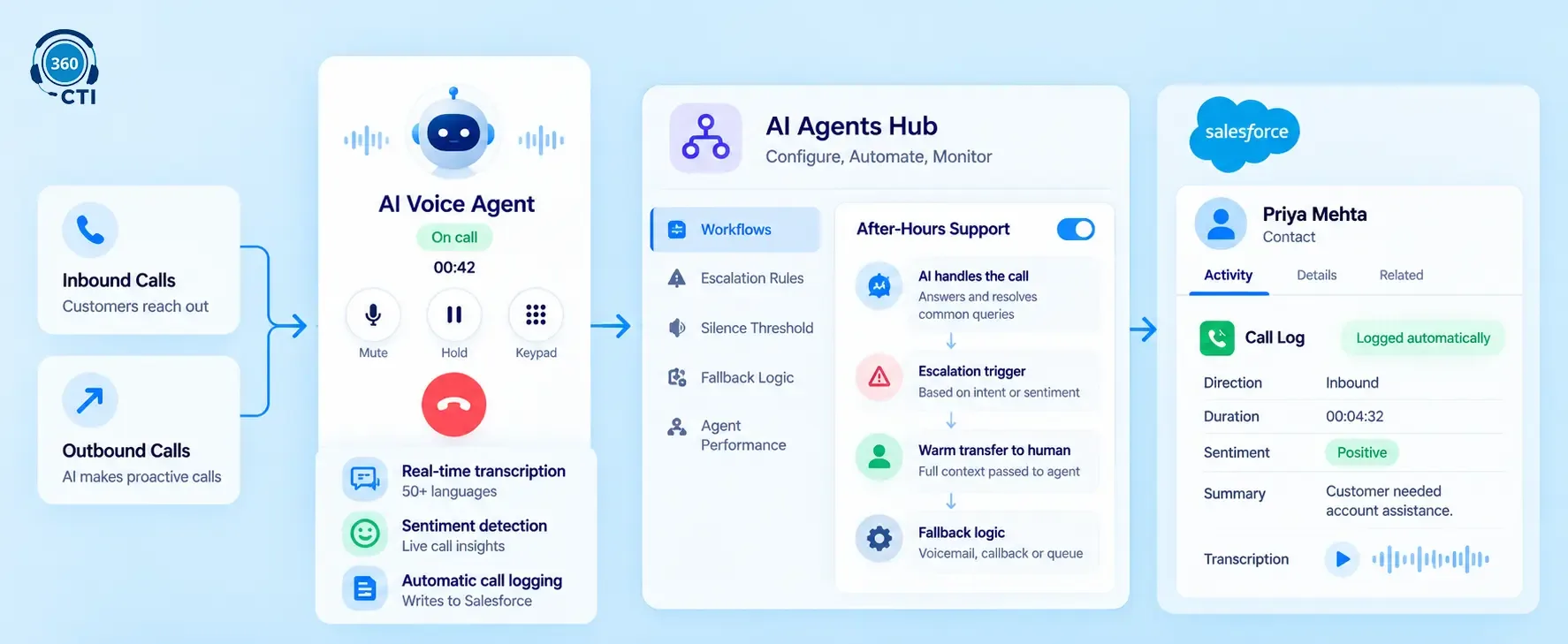
The AI Voice Agent is one of the AI CTI agents for Salesforce built to handle both inbound and outbound calls autonomously: no human needed to initiate or manage the call flow. It transcribes in real time, detects sentiment across 50+ languages, and writes everything to the relevant Salesforce record while the call is live. The record is complete before the call ends.
The AI Agents Hub is the operational layer where you configure which workflows the AI owns, define escalation triggers, set silence thresholds, build fallback logic, and monitor agent performance across every active workflow. It's the management interface that most standalone AI calling tools skip entirely. Without it, you're running workflows you can't see clearly and adjusting settings you can't easily change.
Both components are part of a cloud contact center : Salesforce stack built on a native Salesforce CTI solution: Salesforce-native, no middleware, no external dashboard to check in a second browser tab, no data leaving your Salesforce org unless you've specifically enabled an AI feature that requires an external service. That matters for compliance-conscious teams, and most contact center teams should be compliance-conscious given the nature of the calls they handle.
Start with the Handoff, Not the AI
The agentic AI contact center deployments that hold up over time share one thing in common. Before any workflow was configured and before any AI was activated, the team answered two questions: when does the AI escalate, and what does the human agent see when it does?
Everything else came second.
One workflow, well-configured, with failure modes you understand. That's what a first deployment should be. Not a showcase across six channels at once. Just one thing that works, produces clean data, and tells you where to go next.
If your team is building toward a Salesforce AI contact center and wants to see what full configuration actually looks like, the AI Agents Hub is the right starting point. And if you're still evaluating the broader architecture of how telephony, AI, and CRM connect inside Salesforce, the Cloud Contact Center overview covers the decisions that sit underneath all of it.