
📋 BLOG SUMMARY
Spam likely calls are one of the biggest threats to outbound answer rates in 2026. Carrier algorithms score your numbers based on call volume, duration, STIR/SHAKEN attestation, and recipient behavior — not just intent. This article breaks down the 9 specific causes behind that label and gives you the fix for each one, with an emphasis on what Salesforce-based teams can actually control.
Your rep dials a prospect. On their screen, everything looks normal. On the prospect’s screen: “Spam Likely.” The call never connects. The CRM logs it as no answer. No one on your team ever finds out.
When a carrier blocks your call or labels it “Spam Likely Calls,” your rep’s screen still shows a normal ring. The real reason never surfaces in your CRM. That’s what makes this problem so hard to diagnose — your team is working harder while the system is quietly killing their results.
More than half of outbound business calls are now labeled “Spam Likely Calls” before a prospect even decides whether to answer. For SDR managers watching connect rates drop month over month, the instinct is usually to blame the list, the script, or the reps. The real culprit is almost always a combination of calling behavior, infrastructure choices, and list hygiene that trains carrier algorithms to treat your numbers as a threat.
This article walks through every cause and what to do about it.
How Carriers Decide to Flag Your Number as Spam Likely Calls
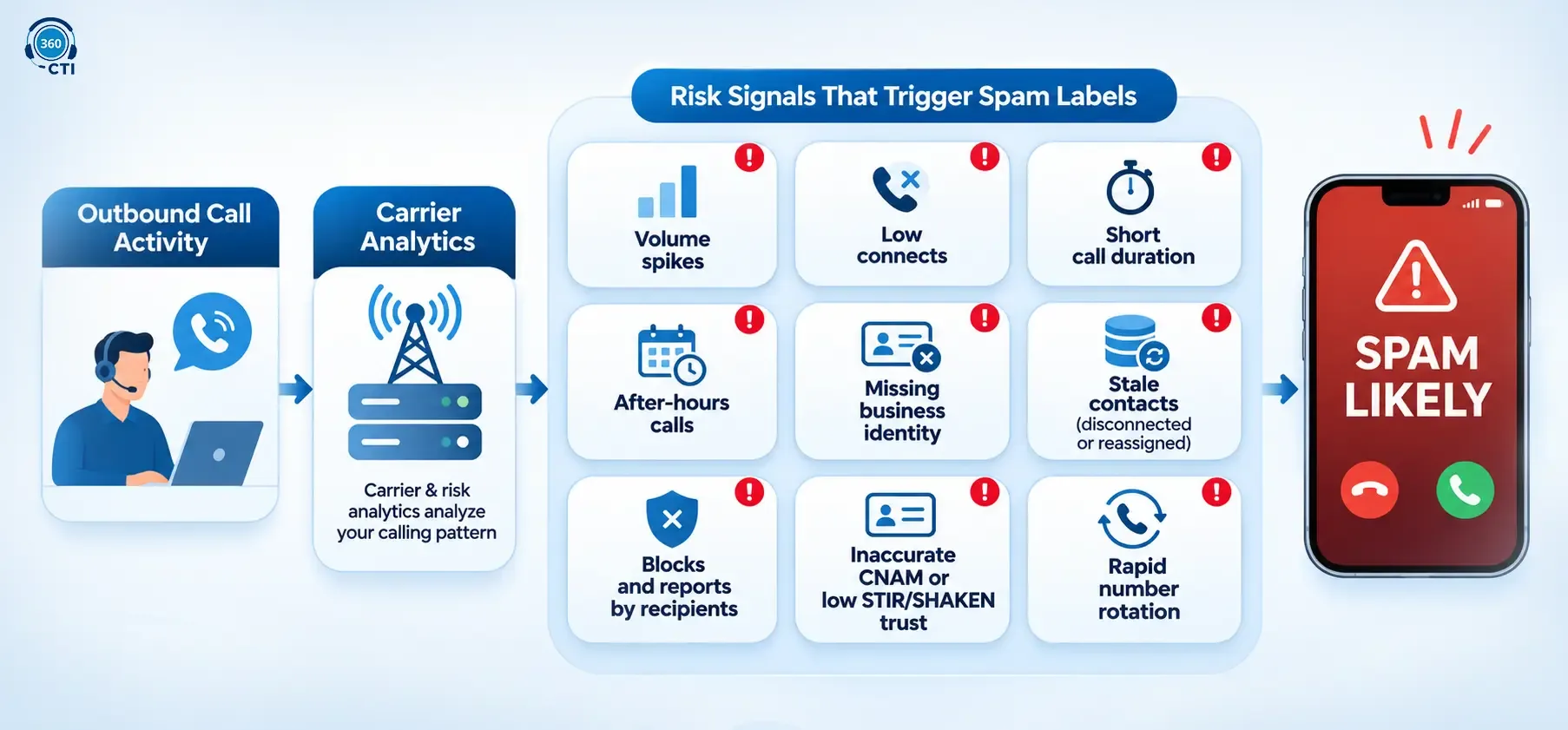
Before diving into the specific causes, it helps to understand the scoring system your numbers are being measured against. Carriers don’t review your calls manually they run them through automated analytics engines that score every outbound number based on behavioral signals.
Networks like Hiya analyze calling behavior across their platforms and assign reputation scores to phone numbers based on factors including call volume per number, answer rate, call duration patterns, and consumer complaint signals from their app user base. When a number crosses the threshold for suspicious behavior, it triggers a label on the recipient’s screen typically “Spam Risk” or “Likely Spam Call” before they decide whether to answer.
STIR/SHAKEN is a cryptographic framework carriers use to sign calls, assigning one of three attestation levels. A-level attestation carries the highest trust signal with receiving carriers. Calls that land at B or C level get scrutinized more heavily and that extra scrutiny raises the probability of a spam label appearing.
The critical thing to understand is that STIR/SHAKEN and spam labeling are two separate systems running in parallel. Even a call with A-level attestation could be labelled “likely spam” if the terminating carrier has other information about the number or calling party attestation ratings are incorporated into carrier analytics as one data element among several, including complaints, calling patterns, and call duration. Clean authentication helps, but it does not override bad calling behavior.
9 Reasons Your Calls Get Marked as Spam
The causes below are not equally common, but they frequently stack on top of each other. A team dealing with low answer rates is usually dealing with two or three of these issues at the same time, not just one. Work through the list systematically and audit your numbers at each step.
1. High Call Volume From a Single Number Triggers Automated Flagging
When one number places a very high volume of outbound calls in a short window, carrier analytics read that pattern the same way they would read a robocaller cycling through a list. The fact that a human is making the calls does not change how the signal looks to an algorithm.
More than 100 to 150 dials per number per day start triggering most algorithms. At 200 or more dials from a single number, flagging is nearly guaranteed.
How to fix it: Keep calls to 75 to 80 per day per number and distribute your team’s dialing activity across a pool of numbers. If your team is placing more than 80 calls per day, a single number will hit the daily volume threshold quickly. New numbers also need a gradual warm-up — starting a fresh number at 10 to 20 calls per day for the first week before increasing to 30 to 50 in week two builds a clean reputation before full-volume use.
For teams running outbound campaigns through Salesforce, your power dialer configuration is where this discipline lives. Set per-number caps at the dialer level so the enforcement is automatic rather than relying on individual reps to self-manage.
2. Low Answer Rate and Short Call Duration Signal Robocall Behavior
Carrier algorithms look beyond just how many calls a number places, they also look at what happens during and after each call. A number that consistently generates brief calls with low answer rates produces the same behavioral pattern that mass robocall campaigns create, regardless of the actual content of those calls.
Short calls compound the problem. When a number generates a pattern of calls that ring briefly and disconnect voicemails that go nowhere, hang-ups in the first few seconds, the algorithm reads that as the behavior of an automated system cycling through a list rather than a rep genuinely trying to reach someone.
How to fix it: Monitor answer rate and average call duration at the number level, not just the team level. Any number dropping below a 15% connect rate after 30 days should come out of rotation for review before the reputation degrades further. Also consider whether your voicemail drop cadences are generating short-call signals that damage number health even when reps are technically reaching contacts.
3. Calling Outside Business Hours Accelerates Reputation Damage
Calling outside the 8am to 9pm local time window creates two separate problems. First, TCPA requires this window for telemarketing calls, so out-of-hours dialing creates regulatory exposure. Second, calls placed early in the morning or late at night generate disproportionately high hang-up rates because recipients are less prepared to take a sales call, and those hang-ups feed directly into the reputation signals carriers use to score your numbers.
The time zone problem is easy to miss on teams that work national territory. A rep in London calling a prospect in California at 9am GMT is reaching that person at 1am local time.
How to fix it: Set calling windows at the campaign level using the time zone field on the contact record inside Salesforce. The rule should govern when that specific number gets dialed, not when the rep happens to be working. Building this logic into your outbound dialer campaigns prevents the accidental off-hours call that damages a number’s reputation for weeks.
4. Unregistered Numbers With No Business Identity Look Anonymous to Carriers
When a carrier sees an outbound number with no registered business identity attached to it, the call looks identical to an unknown personal cell or an automated system. Analytics engines have no context to work with just a number generating outbound traffic with no verifiable owner — and anonymous calls attract scrutiny faster than identified ones.
Registering your numbers does not guarantee they will never be flagged, but it gives the analytics engines a business identity to associate with your calling activity, which reduces the speed at which volume triggers a label.
How to fix it: Free Caller Registry, a free service created by the three major analytics engines that work with US wireless carriers, lets you submit a single request so all three reconsider any “Spam Likely Calls” tag on your number. Register every number your team uses at freecallerregistry.com, not just the ones that have already been flagged. The process takes about ten minutes per number and costs nothing.
📌 DID YOU KNOW
Around 78% of Americans say they are more likely to answer a call if it displays a recognizable brand name and logo, and 77% say branded calling solutions would help them feel more protected. Business identity registration is not just a compliance step — it directly influences whether a known contact answers a call from your team.
5. Contacting Disconnected, Reassigned, or Stale Numbers Generates Instant Complaints
Calling numbers that have been disconnected, reassigned, or sitting inactive on your list for months is one of the fastest ways to generate negative carrier signals. When a call lands on a reassigned number, the new owner has no relationship with your business and is significantly more likely to report the call as spam. That report hits the carrier analytics immediately and can accelerate reputation damage on the specific number your team used to place that call.
This is not just about DNC compliance. Stale data creates spam flags even on numbers that are technically reachable if the person on the other end has no idea who you are and no context for why you’re calling, the probability of a complaint increases sharply.
How to fix it: Scrub your contact lists against the National Do Not Call Registry and validate numbers before they enter your calling campaigns. Inside Salesforce, this means enforcing list hygiene before syncing contacts to any outbound sequence. Set a maximum contact attempt threshold per record and remove contacts from active rotation once they hit that ceiling.
6. Repeated Blocking and Reporting by Recipients Compounds Quickly
A single spam report can damage a number’s reputation meaningfully. Because carrier algorithms are largely opaque, many organizations are unaware of a problem until performance metrics begin to decline. By that point, a number’s reputation may already be in recovery mode rather than active damage control.
The most common scenario is a team continuing to call contacts who have already blocked or reported them, because the CRM has no visibility into carrier-side block signals. The rep logs “no answer,” schedules another attempt, and the number’s reputation erodes with each successive attempt.
How to fix it: Treat a sharp drop in answer rate on a specific number as an early warning that recipients are actively blocking, not just unavailable. Pull that number from rotation, run it through a lookup tool like Hiya’s reputation dashboard, and dispute the label through the carrier’s remediation process. Do not just swap in a new number and repeat the same calling pattern — the underlying contact data will produce the same outcome on the replacement number.
7. Missing or Inaccurate Caller Name (CNAM) Increases Hang-Up Rates
CNAM is the database that tells the recipient’s phone what name to display next to your number. Without it, your call appears as a bare ten-digit string, which looks indistinguishable from an unknown personal cell or an automated dialer. That anonymous display increases the probability of a hang-up or report, feeding back into the reputation cycle over time.
CNAM does not remove an existing spam label — but accurate caller information does improve answer rates because recipients have something to recognize. Teams that display a business name consistently build familiarity with the contacts they call repeatedly, which reduces the report rate on subsequent dials.
How to fix it: Register your CNAM through your telephony provider so your business name appears on outbound calls. Treat this as a baseline protection for clean numbers rather than a remedy for flagged ones. CNAM registration costs very little and takes minimal setup time, but it’s worth confirming that your provider actually pushes the CNAM update to all major carrier databases, not just one.
8. B or C Level STIR/SHAKEN Attestation Increases Vulnerability to Flags
STIR/SHAKEN assigns a trust level to every outbound call your carrier signs. The level tells the receiving network how much the signing provider actually knows about the call’s origin. A-level attestation carries the highest trust signal with receiving carriers. Calls that land at B or C level get scrutinized more heavily.
B and C attestation do not automatically trigger a “Spam Likely” label, but they increase how heavily the analytics engine weighs other negative signals. An A-attested number with high volume and low answer rates can still get flagged. A B-attested number with the same profile is significantly more vulnerable. The two systems interact lower attestation reduces the margin for error your calling behavior has before a label appears.
How to fix it: Ask your telephony provider directly what attestation level your outbound calls receive and why. On May 20, 2026, the FCC adopted a Further Notice of Proposed Rulemaking proposing the most significant expansion of STIR/SHAKEN obligations since the framework was first deployed. Carriers are under increasing regulatory pressure to sign calls accurately, and your provider’s attestation practices matter more now than they did 18 months ago. If your provider cannot clearly explain what level your calls receive, that is a conversation worth having before answer rates deteriorate further.
9. Rotating Numbers Too Aggressively Prevents Reputation From Building
Number rotation is the right strategy for protecting per-number call volume, but rotating too fast creates its own problem. When a business cycles through new numbers at high frequency retiring numbers after a week or two and spinning up replacements constantly analytics engines start treating the entire calling operation as suspicious. Each new number has no reputation history, which means it starts life with no trust buffer and gets flagged faster when volume builds.
A pool of numbers that rotate at the right pace is very different from a constant stream of fresh numbers that never accumulate enough positive calling history to withstand normal volume.
How to fix it: Size your pool based on your actual call volume. Divide the calls your team places per day by the daily cap you want per number that tells you how many numbers you need, and usually it is fewer than teams expect. Numbers that have built a clean reputation over weeks of moderate, consistent usage are more durable than fresh numbers pushed immediately to full volume. Warm up new additions to the pool before routing production traffic through them.
Is your outbound answer rate declining and you’re not sure which numbers are the cause?
Identifying flagged numbers early — before the label spreads to your whole pool — is the difference between a quick fix and a full campaign rebuild.
Book a Demo →How to Check Which of Your Numbers Are Already Flagged
Before fixing anything, you need to know which numbers are actually affected. The diagnostic is straightforward: call your own active numbers from a personal mobile device and note what the recipient screen displays. If you see “Spam Likely,” “Spam Risk,” or “Scam Likely,” that number has been flagged by at least one carrier’s analytics engine.
For a systematic audit, run your active numbers through Hiya’s free reputation dashboard at hiya.com/products/registration, which shows current spam status and the factors contributing to the score. TNS (Transaction Network Services) and First Orion operate similar lookup tools that cover different carrier networks running your numbers through all three gives a fuller picture than any single lookup provides.
Timing matters here. A sudden drop in answer rate on a specific number is often the first sign of a flag, and it usually shows up before any lookup tool reports it. Build a weekly review into your outbound operations so you’re catching reputation degradation while it’s still recoverable, not after the label has been visible to contacts for two weeks.
How Salesforce Call Data Helps You Stay Off Spam Lists
The underlying data problem for most flagged outbound teams is that call outcomes, durations, and patterns are not tracked at the number level inside their CRM. Reps log dispositions, but no one aggregates those dispositions by the specific DID that placed the call. That gap means reputation problems develop invisibly, and the first signal a manager gets is a campaign-level drop in connect rate that could have been caught number by number weeks earlier.
Salesforce gives you the data layer to fix this. When every call logs automatically with the outbound number, duration, disposition, and outcome captured on the contact record you have everything you need to monitor number health in near real time. A sudden concentration of short-duration, no-answer calls from a specific DID becomes visible in a Salesforce report rather than hidden in a telephony dashboard most managers never open.
For teams using 360 CTI’s AI calling capabilities, call transcription and sentiment analysis add another layer: you can correlate answer rate trends with conversation quality and identify whether certain calling patterns are generating negative recipient reactions before those reactions turn into spam reports. Combined with your Salesforce calling solution, list hygiene decisions, calling window enforcement, and number rotation discipline can all be managed from inside the platform your team already uses, which means the data driving those decisions actually gets acted on.