
Guide
360 CTI User Guide for India
Everything agents and admins need to use 360 CTI in India: calling from Salesforce, routing, IVR, voicemail, recordings, AI transcripts and setup.
Read Guide →How a call travels between your Salesforce org, the telephony provider, the carrier and your customer, explained with the 360 CTI architecture diagram.
This guide explains how a call travels between Salesforce, the telephony provider, the carrier and your customer when you use 360 CTI. It is useful for Salesforce admins, IT and security teams who want to understand what connects to what before rolling 360 CTI out.
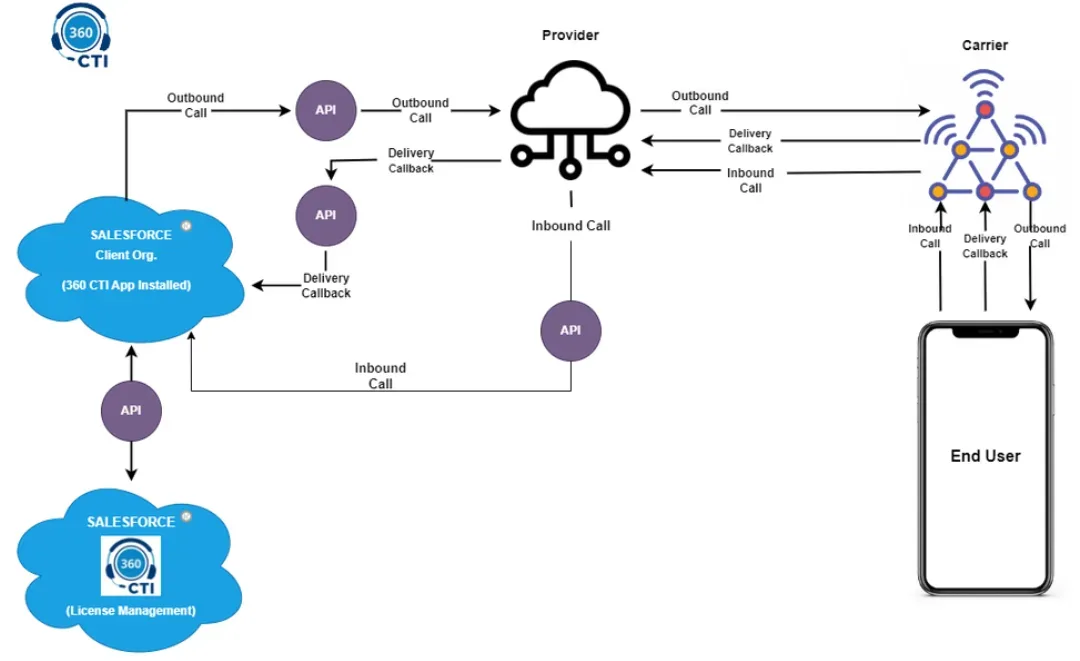
| Component | What it does |
|---|---|
| Salesforce client org (360 CTI app installed) | Your own Salesforce org. Agents make and receive calls here, and every call is logged on the right Salesforce record. |
| Salesforce org for License Management | 360 CTI's licensing org. It connects to your org through an API to manage your 360 CTI licenses. |
| Provider | The telephony provider that places and receives calls on behalf of 360 CTI. |
| Carrier | The telecom network that connects the call to the customer's phone. |
| End user | Your customer or prospect on their phone. |
| APIs | Every connection between Salesforce and the provider runs through an API, in both directions. |
As a call progresses, the carrier sends delivery callbacks to the provider, and the provider sends them on to Salesforce through an API. These callbacks carry the status of the call, so 360 CTI can update the call in Salesforce, for example when it is answered, ends or is not answered.
Your Salesforce client org connects to the 360 CTI License Management org through an API. This is how 360 CTI checks and manages the licenses for your users.
Need help setting this up in your Salesforce org? Talk to a 360 CTI expert and get it working for your team.
Talk to an ExpertEverything agents and admins need to use 360 CTI in India: calling from Salesforce, routing, IVR, voicemail, recordings, AI transcripts and setup.
Read Guide →The full 360 CTI user guide for international numbers: outbound and inbound calls, CTI Setup, Power Dial, IVR, call routing and AI features.
Read Guide →Set up 360 CTI AI features: the AI Voice Bot, live call transcription, auto call tagging, sentiment analysis and live call coaching.
Read Guide →