
Guide
360 CTI User Guide for India
Everything agents and admins need to use 360 CTI in India: calling from Salesforce, routing, IVR, voicemail, recordings, AI transcripts and setup.
Read Guide →How 360 CTI handles inbound and outbound calls on PSTN and VoIP numbers in India, including user status, voicemail, groups and sticky agents.
| PSTN and VoIP numbers calling functionalities | 3 |
|---|---|
| User Status wise- Voicemail- Missed Call Forwarding- In case of Group- In case of Sticky agent- VoIP number- Custom Settings- | 4 4 4 5 5 6 6 |
Note: When a call is received by the organization, the system first checks the Out of Office status, which operates based on the time range configured in the General Settings. After this check, the configured call flow settings take effect.
PSTN number- For the PSTN number, the call will first land to the agent mobile device and if agent pick the call then the call will land to the end user (customer end), but if the agent declines the call, then the call will not be land to the end user.
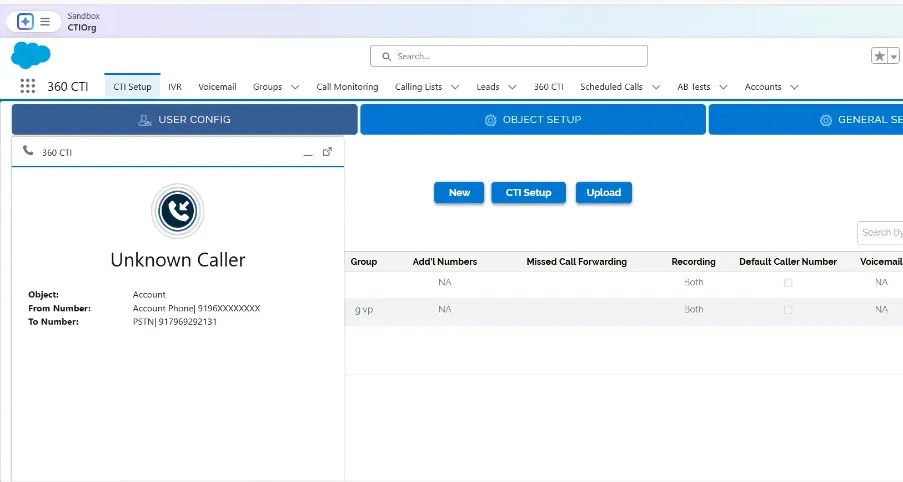
For incoming, when the customer dials the PSTN number in that case the call will ring to the agent's mobile device and a pop-up will appear for the same in the desktop. User can’t decline or accept the call from the desktop in case of a PSTN number.
When the agent accepts the call from a cell phone, then the incoming softphone will open on a desktop, and the agent can decline the call from the cell phone itself.
If in User config record with only Primary user than Incoming call will route to Primary user if user accept the call than incoming task will assign to the primary user and if user rejects the call then the missed call task assigned to the primary user itself.
If the record is created with primary user with forwarding number (voicemail)- In case if the forwarding number is set to the missed call forwarding field, call routing, and then the call will route to the Primary user and in case if the primary user receives the call then the task will be created in the Call logs which is assigned to the respective user who picks the call, if user rejects the call or on call, away, offline then the call will forwarded to the missed call forwarding number.
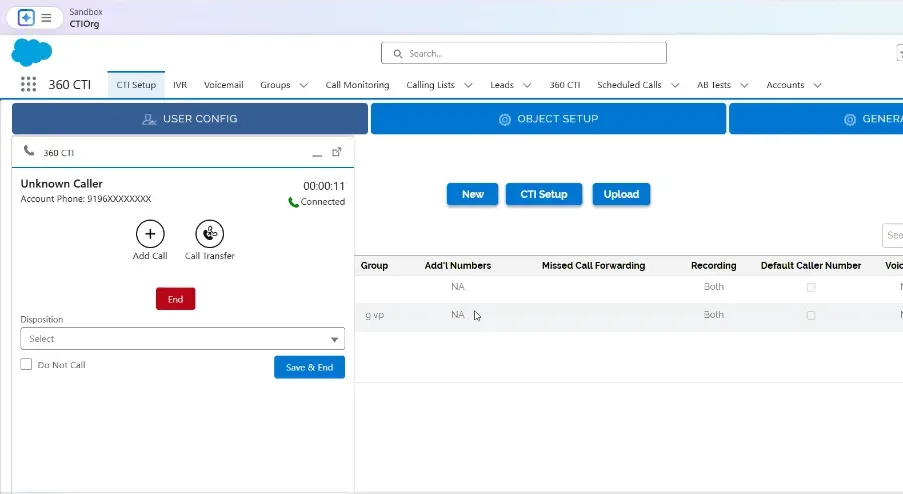
In case of Offline or Away- If your softphone status is set to Offline or Away, any incoming calls to your number will be automatically disconnected.
In case of Online- If the user's softphone status is Online and they are already on a call, any incoming call to their PSTN number will be immediately dropped
If the user has set up a voicemail number, and someone calls their PSTN number while their status is Away, Online, or Offline—or if they are already on another call—the configured voicemail will be played to the caller
You can add an alternate number in the Missed Call Forwarding section under User Configuration. If you are unavailable, Away, Offline, or unable to receive the call, it will be automatically routed to the number(s) specified in that section.
Note:
>> You can configure either Missed Call Forwarding or a Voicemail message—only one can be active at a time >> If no number is specified in the Missed Call Forwarding section, the incoming call task will be assigned to the primary user. However, if a number is provided in the Missed Call Forwarding section, the task will be routed to the user associated with that number.
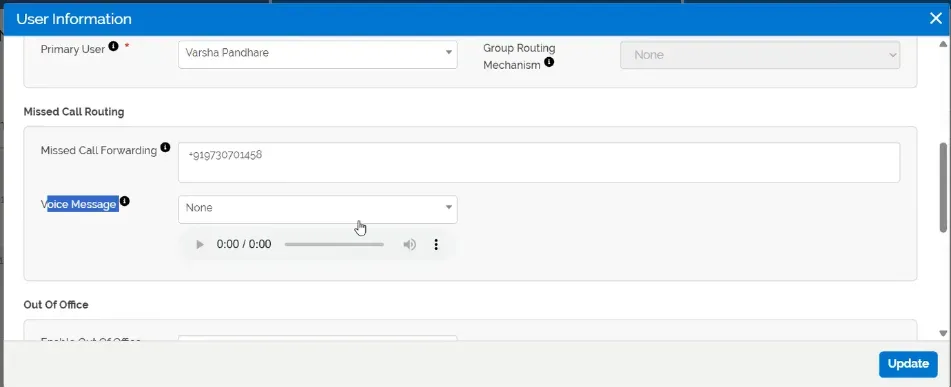
If a group is configured under User Config record, the primary user must be part of that group. Incoming calls will be routed based on the selected group routing mechanism—Round Robin, Longest Wait Time, Random, or Sequential. The call will will route to the group member according to the group routing mechanism. The user who answers the call from the group will be assigned the corresponding incoming call task if nobody picks the call from the respective group then the missed call task will assign to the primary user.
Lets say if we have lead record and under which sticky agent is configured then the call will be land to the sticky agent first always (Sticky agent should have the number access). If there is a Last communicator and Sticky, both are present, then the call will route to the Sticky agent (Sticky agent has the high priority amongst both)
For VOIP numbers, the call will be connected directly to the receiver's/customer's mobile device, and in desktop incoming popup will appear in the softphone, and the user can decline the call from the desktop as well and in case of incoming then the incoming popup will appear on the desktop softphone and user can accept or reject the call from desktop as well.
Note: All configurations and features mentioned above are equally applicable to VoIP numbers
A custom setting is available under CTI General Settings to enable or disable 'Last Communicator' accessibility. When enabled, incoming calls are routed directly to the group instead of the last communicator.
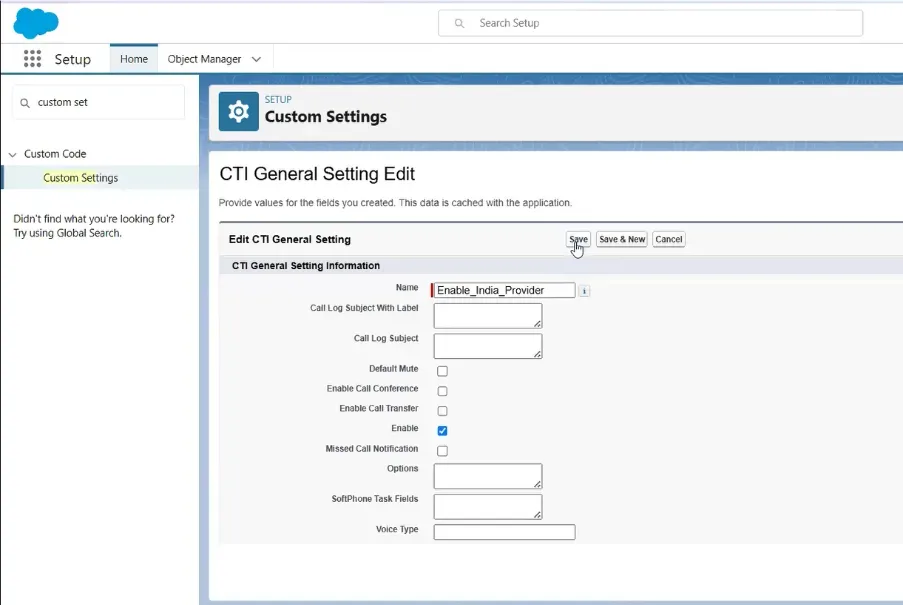
Once the respective custom setting is enabled, three general settings become accessible.
Note: Only one of these three checkboxes can be enabled at a time.
Need help setting this up in your Salesforce org? Talk to a 360 CTI expert and get it working for your team.
Talk to an ExpertEverything agents and admins need to use 360 CTI in India: calling from Salesforce, routing, IVR, voicemail, recordings, AI transcripts and setup.
Read Guide →The full 360 CTI user guide for international numbers: outbound and inbound calls, CTI Setup, Power Dial, IVR, call routing and AI features.
Read Guide →Set up 360 CTI AI features: the AI Voice Bot, live call transcription, auto call tagging, sentiment analysis and live call coaching.
Read Guide →