
📋 BLOG SUMMARY
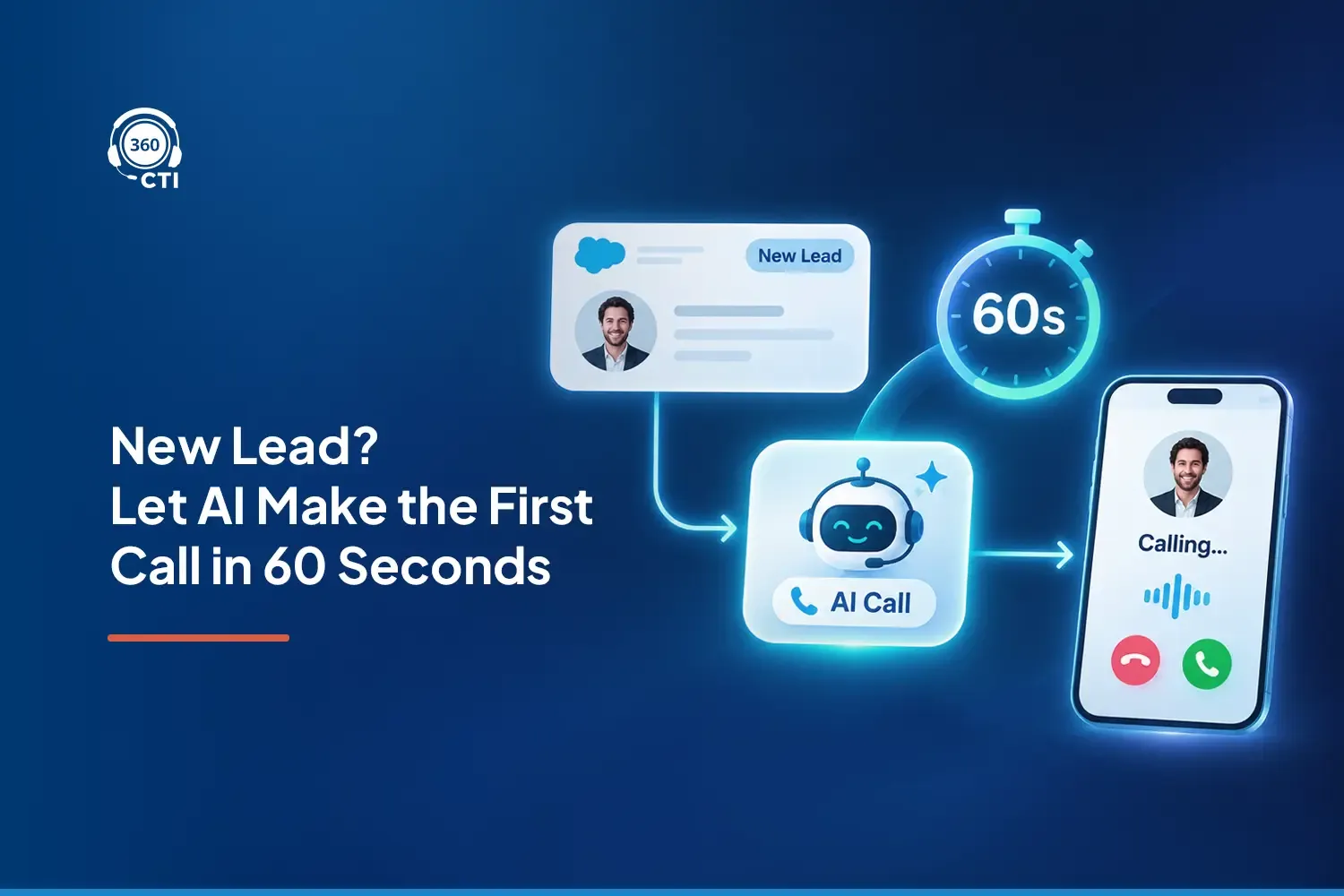
Speed to lead measures how quickly your sales team responds to a new inquiry. With the right Salesforce automation, an AI voice agent can initiate a call within 60 seconds of lead creation, qualify the prospect, connect them with a rep, and automatically log the outcome. The one-minute target depends on consent, configuration, telephony availability, and successful workflow execution.
A prospect fills out your demo form at 10:02 a.m. They're interested, available, and expecting someone to respond.
Your lead enters Salesforce immediately. But the assigned rep is on another call. By the time they open the record, review the details, and dial the number, the prospect may already be speaking with another provider. That's where traditional lead management breaks down.
Improving speed to lead salesforce isn't simply about asking sales reps to work faster. It's about removing the delay between a prospect showing interest and your business making its first contact attempt.
An AI voice agent can help automate that first response. Once a lead is created, a properly configured workflow can check calling eligibility, initiate outreach, ask qualification questions, and pass qualified prospects to the right representative.
The result is a more consistent first-touch process, including when your sales team is busy.
But calling within 60 seconds isn't something software achieves automatically. You need the right triggers, CRM data, consent controls, routing logic, and measurement framework. Here's how to build that process.
What to Speed Lead in Salesforce and Why Do Minutes Matter?
Speed to lead is the time between a prospect expressing interest and your company's first response or contact attempt. For phone-based sales teams, it's commonly measured from lead creation to the first outbound call attempt.
The distinction matters because a lead can enter your CRM instantly and still wait hours for a conversation.
Planning Automated Calling? Salesforce CTI Integration & Migration Checklist
Check integration dependencies, call logging, routing, and migration risks before deployment.
Get the Free Checklist →What Research Says About Lead Response Time
In its March 2011 article, The Short Life of Online Sales Leads, Harvard Business Review reported that companies attempting contact within an hour were nearly seven times as likely to qualify a lead as companies waiting another hour.
The research highlights the importance of timely follow-up, although it's historical evidence, not a contemporary benchmark for AI calling.
For sales operations leaders, the practical takeaway is simple: lead response time should be managed as a measurable business process, not left entirely to individual rep availability.
Is Under 60 Seconds a Good Target?
A first call attempt within 60 seconds is an ambitious operational target for eligible, high-intent leads.
Consider someone requesting a product demo or pricing consultation. They're expecting a response, and the information they submitted is fresh.
A fast first attempt can reduce the delay between inquiry and engagement. However, a call that starts within one minute isn't necessarily answered, and a fast attempt doesn't guarantee qualification.
Measure these events separately:
- Lead creation: When the inquiry enters your CRM.
- First call attempt: When dialing actually begins.
- First connection: When the prospect answers.
- Qualification: When the required sales information is captured.
This gives your team a clearer view of whether faster calling is producing better conversations.
Why Most Salesforce Teams Are Slow to Call Back
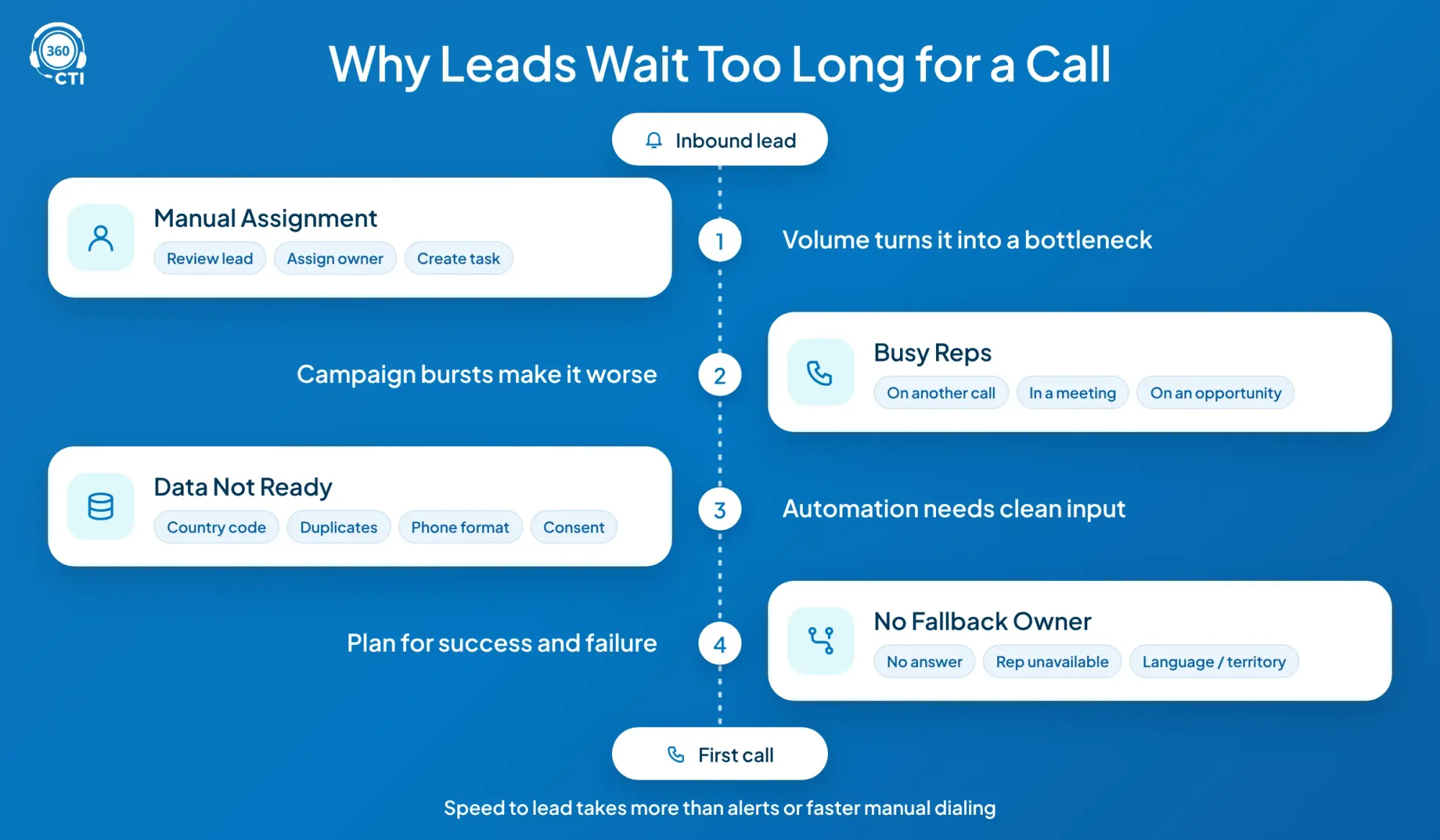
Most teams don't intentionally ignore inbound leads. Their workflows introduce delays that accumulate before anyone makes the first call.
Leads Wait for Manual Assignment
A website inquiry enters the CRM, but someone still needs to review it, assign an owner, and create a follow-up task. That might work with a small number of leads. As volume increases, manual assignment becomes a bottleneck.
Reps Are Busy When Leads Arrive
A rep could be on another call, attending a meeting, or handling an existing opportunity. Even when an alert arrives immediately, an available salesperson isn't guaranteed. This is especially problematic when marketing campaigns generate bursts of inquiries at the same time.
Lead Data Isn't Ready for Calling
Missing country codes, duplicate records, incorrect phone formats, and incomplete consent information can stop a lead from entering the calling workflow. A fast automation process still needs reliable input data.
Nobody Owns the Follow-Up Exception
A call goes unanswered. The rep is unavailable. The contact needs a different language or territory. If the workflow has no fallback, the lead sits in a queue until someone notices. Better inbound lead routing means defining what happens when the first attempt succeeds and when it doesn't.
That's why fixing speed to lead in Salesforce requires more than notification emails or faster manual dialing.
How an AI Voice Agent Calls Every Eligible New Lead Automatically
An AI voice agent for inbound leads can initiate outbound follow-up after a prospect submits a form. The lead originated inbound, but the resulting AI-initiated phone call is outbound and must comply with the applicable calling rules.
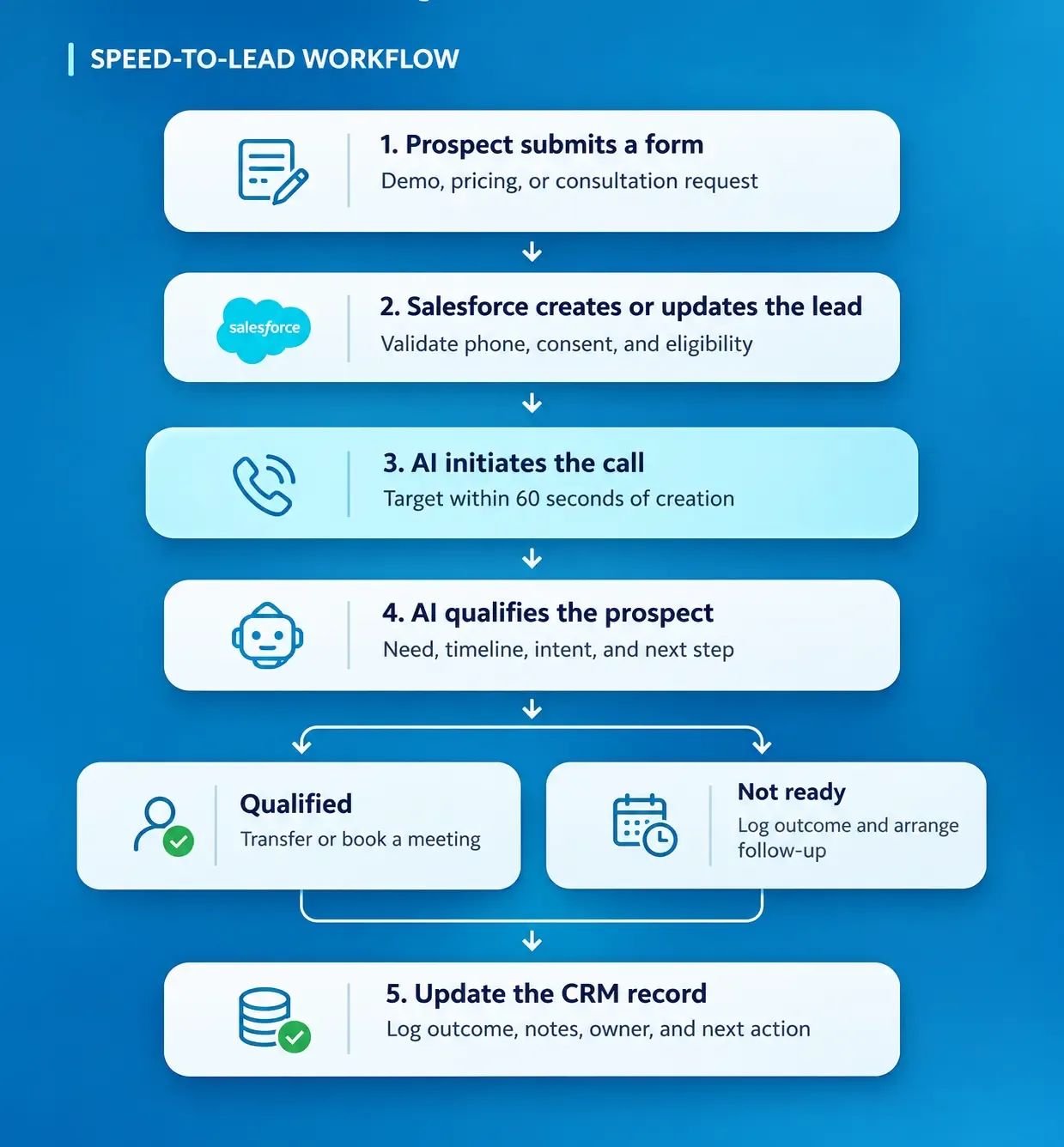
Here's the recommended workflow.
Step 1: Capture the Lead and Its Calling Permissions
The process begins when a prospect submits a web form.
Your CRM captures the name, phone number, inquiry type, source, and submission timestamp. The workflow should also preserve the applicable consent record, including the disclosure accepted and when it was submitted.
Don't trigger a voice call simply because a phone number exists.
Step 2: Validate and Prioritize the Record
Before dialing, the system checks whether the lead is eligible for automated outreach.
That includes phone-number validation, duplicate checks, suppression lists, permissible calling hours, and any applicable consent requirements.
High-intent inquiries can be prioritized while records that fail checks are directed to manual review.
Step 3: Initiate the AI Call
Once the eligibility checks pass, a configured automation sends the lead to the voice-calling system.
The agent can introduce itself, identify the company, confirm the reason for the inquiry, and begin the approved qualification conversation.
The goal is to initiate eligible calls within 60 seconds, although processing delays, call restrictions, and telephony availability can affect actual performance.
360 CTI's AI Voice Agent supports automated outbound qualification, conversation outcomes, and CRM updates. Its product documentation also describes human handoff capabilities.
Step 4: Qualify, Book, or Route
If the prospect answers, the AI collects the information needed to determine the next action.
A qualified prospect can be transferred to an available rep or offered an appointment, depending on the configured integrations.
An unanswered call should create a clear, permission-compliant follow-up outcome rather than repeat indefinitely.
Step 5: Log the Conversation and Next Action
The calling solution writes the relevant activity back to the record.
This should include the attempt timestamp, call status, qualification answers, disposition, summary, and follow-up owner.
When a human rep takes over, they should receive the context already collected. The value isn't just a fast call. It's a complete and accountable handoff.
📌 DID YOU KNOW
Your AI Voice Agent Could Qualify a Lead Before a Sales Rep Even Opens the Record.
A properly configured AI voice agent can initiate an eligible lead's first call, ask qualification questions, capture buying intent, and prepare a handoff while your sales reps are handling other conversations. That means the first interaction doesn't have to wait for a rep to become available.
What Should an AI Voice Agent Ask to Qualify Inbound Leads?
A good qualification script should collect enough information for the next sales action without turning the first conversation into a lengthy questionnaire.
Your objective isn't to have AI complete the entire sales process. It's to establish why the prospect reached out, whether the inquiry fits your offering, and what should happen next.
A Practical AI Lead Qualification Script
EXAMPLE: B2B SOFTWARE DEMO REQUEST
| Stage | What the AI Says |
|---|---|
| Introduction | “Hi Alex, I'm an AI assistant calling from Acme Software. You recently requested information about our product. Is now a good time for a quick conversation?” |
| Understand the requirement | “What are you hoping to improve with your current setup?” |
| Understand the timeline | “Are you actively evaluating options, or is this for a future project?” |
| Identify the next step | “Would you like me to connect you with our solutions team or help arrange a consultation?” |
| Close with confirmation | “Thanks. I'll pass those details to the team so you won't need to repeat everything.” |
The script should adapt to the prospect's responses. Someone who immediately requests pricing shouldn't be forced through unrelated qualification questions.
Which Qualification Details Matter?
For most B2B teams, the initial conversation can focus on:
- Business need: What problem prompted the inquiry?
- Timeline: When does the prospect want a solution?
- Buying context: Are they researching or actively evaluating?
- Next step: Would they prefer a meeting, callback, or live transfer?
Avoid collecting sensitive financial, medical, or other unnecessary personal information through an introductory AI call.
Also, keep the agent within approved product information. If it doesn't know an answer, it should offer a human handoff instead of inventing pricing, commitments, or capabilities.
When Should the AI Voice Agent Hand Off to a Human Rep?
An AI voice agent should hand off when the conversation requires human judgment, the prospect explicitly requests a person, or the opportunity is ready for a sales discussion.
A well-designed inbound lead routing workflow uses more than a generic queue.
Route High-Intent Prospects Immediately
A prospect asking to purchase, request a proposal, or discuss implementation may deserve an immediate transfer.
Use CRM context to select the appropriate territory, product specialist, account owner, or available representative.
Escalate Questions AI Can't Reliably Answer
Negotiations, unusual contractual requirements, complaints, complex technical questions, and sensitive information should have clear escalation rules.
The agent shouldn't continue simply because it can generate a response.
Preserve Context During the Handoff
A transfer is only useful when the next person knows what happened. The receiving rep should see the customer's original inquiry, qualification answers, call summary, and reason for escalation.
With AI call routing in Salesforce, teams can evaluate routing based on factors such as customer context, ownership, and available agents.
If no suitable rep is available, the workflow should offer a permitted callback or booking option and assign a clear follow-up owner.
How Did a U.S. Finance Firm Reduce Missed Client Calls by 58%?
Discover how an AI Voice Agent helped handle after-hours inquiries, capture customer intent, and improve follow-up speed.
Explore the Case Study →Setting Up Speed to Lead in Salesforce: 5 Steps
A reliable speed-to-lead Salesforce workflow needs the right automation, data, and operational controls.
Start with one lead source rather than automating every campaign immediately.
Step 1: Define the Lead Trigger
Choose which events qualify for immediate outreach.
Examples include a demo request, a pricing inquiry, or a consultation form submission.
Configure the relevant Salesforce Flow or supported integration to detect the event. For existing contacts, consider whether the workflow should update an existing record instead of creating a duplicate.
Record the original inquiry timestamp so the response-time calculation remains accurate.
Step 2: Configure Lead Assignment and Eligibility
Define the rules that determine whether automated calling is permitted and which team owns the lead.
Your checks should include the consent record, phone format, country, lead source, duplicate status, and permissible calling hours.
Use a dedicated exception status when a lead can't be called.
The lead and agent management capabilities in 360 CTI support CRM-connected lead assignment and performance visibility.
Step 3: Connect the AI Voice Agent
Configure the supported voice integration so an eligible lead can trigger an outbound call.
Set up the approved conversation script, allowed business information, qualification fields, and escalation conditions.
Before launch, test whether the AI can access only the CRM information it needs and whether it handles unavailable information appropriately.
The exact trigger-to-call configuration and achievable latency should be validated with the product team.
Step 4: Define Call Outcomes and Fallbacks
Every call should result in a meaningful next action.
| Outcome | Recommended Action |
|---|---|
| Qualified | Transfer or book |
| No answer | Schedule permitted retry |
| Callback requested | Assign follow-up |
| Not interested | Update disposition |
| Opted out | Suppress further outreach |
| Technical failure | Flag for review |
Avoid leaving outcomes as unstructured notes. Consistent dispositions make it easier to track lead quality and follow-up completion.
Step 5: Run a Controlled Pilot
Test the workflow with representative leads before enabling it across all campaigns.
Include successful calls, unanswered attempts, invalid phone numbers, duplicate records, unavailable reps, opt-outs, and system errors.
Measure whether call attempts actually begin within your target time and whether each result is recorded correctly.
Only expand the rollout after you've confirmed that the system works reliably under realistic conditions.
Compliance: Don't Treat Form Submission as Automatic AI Calling Consent
For U.S. outreach, the Telephone Consumer Protection Act (TCPA) applies to calls using AI-generated voices. The FCC confirmed in February 2024 that AI-generated voice calls fall within restrictions covering artificial or prerecorded voices.
A form submission by itself doesn't establish that the prospect agreed to receive automated AI-voice calls. For telemarketing calls, applicable rules may require prior express written consent with specific disclosures.
The FTC also imposes requirements concerning prerecorded telemarketing, calling hours, opt-outs, and other practices. See its Telemarketing Sales Rule compliance guidance.
Before activation, have counsel review your consent language, AI disclosure, recording notice, calling hours, state-law obligations, and suppression procedures.
Fast outreach only creates value when it's lawful, expected, and relevant.
Measuring Speed to Lead in Salesforce: The dashboard
If you can't distinguish a fast attempted call from a successful conversation, your dashboard will give you a misleading picture of performance.
The most useful speed-to-lead dashboard connects response speed with qualification and pipeline outcomes.
Seven Metrics Sales Ops Should Track
| Metric | What It Measures |
|---|---|
| Median first-attempt time | Typical time to first dial |
| Calls within 60 seconds | Percentage meeting the target |
| Connection rate | Answered calls / attempts |
| Qualification rate | Qualified / connected leads |
| Human handoff rate | Transfers / connected leads |
| Follow-up completion | Tasks completed on time |
| Lead-to-meeting rate | Meetings / eligible leads |
Segment these metrics by campaign, lead source, time of day, territory, and AI versus human-first outreach.
Measure the Outcome, Not Just the Speed
Suppose your AI initiates nearly every eligible call in less than a minute, but very few prospects answer.
Your automation is fast. Your engagement strategy may still need improvement. You might need to adjust permitted calling windows, improve contact data, or change how your form sets expectations about receiving a call.
Similarly, a high connection rate with poor qualification outcomes could indicate weak targeting or an ineffective conversation script.
Compare results against a pre-automation baseline and, where practical, use comparable lead cohorts. Don't attribute every improvement to AI without accounting for changes in campaign quality, seasonality, or lead volume.
For deeper reporting guidance, see how AI call routing affects lead response time and conversion rates.
Conclusion
Lead in Salesforce isn’t about forcing salespeople to respond faster isn't about forcing salespeople to respond faster. It's about designing a process where interested prospects don't wait unnecessarily for the first conversation.
With a properly configured AI voice agent, an eligible new lead can trigger an immediate call attempt, receive initial qualification, and move to the right representative with the relevant context already captured.
But speed alone isn't the goal. Consent, accurate CRM data, reliable handoffs, and measurable qualification outcomes matter just as much.
If your team is looking to automate that first interaction, explore how the 360 CTI AI Voice Agent supports outbound lead qualification, CRM updates, and human handoffs.